
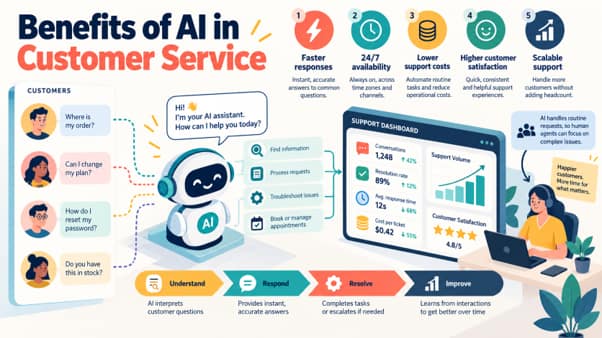
Any vendor page will give you the list: faster replies, lower costs, round-the-clock coverage, happier agents. Each item is true for some support team. Whether it is true for yours depends on a condition the list leaves out, and a team that skips the condition gets the tool’s invoice without the benefit.
Below are seven benefits that hold up in practice. Each comes with what has to be in place first and the number that tells you whether you are getting it.
Customers wait less for a result
An AI replies in seconds at any hour. That matters most when the reply is the result: an order status, a password reset, a refund that has actually been issued. For a customer who writes at 11 p.m. on a Saturday, the gap between “done” and “we will get back to you on Monday” is the whole experience.
The condition is that the AI can finish the request. If it only acknowledges the ticket and queues it, first response time drops to near zero while the customer waits exactly as long as before. Measure time to resolution for each request type. First response time will flatter you.
Coverage across hours and languages without extra shifts
Language models read and write most major languages, so one automated workflow can serve customers your team cannot staff for: the night hours, or a market where you have two hundred customers and no native speaker on the team.
Two things have to exist for this to work. The policies for that market must be documented, because refund rules and shipping terms often differ by country. And someone has to pick up what the AI cannot close. If no agent can take a Portuguese ticket, you have added coverage for the easy requests and a dead end for the hard ones. Split resolution rate and CSAT by language and by hour to see which of the two you built.
Ticket volume stops dictating headcount
Support has always scaled by hiring: more customers bring more tickets, which need more agents and more team leads to manage them. Automation breaks that link for the repetitive share of the queue. A seasonal peak or a launch that doubles “where is my order” tickets no longer calls for temporary staff trained in three weeks.
This holds only if the requests that grow with your customer base are the ones you automated. If the AI handles password resets and your growth brings billing disputes, headcount will keep following volume. Watch the number of tickets that reach an agent each month against total tickets. The first line should flatten while the second climbs.
Cost per resolved ticket goes down
A ticket closed by automation costs less than one that takes an agent ten minutes, and the pricing in this market increasingly makes the comparison easy. Several vendors bill per resolved ticket and charge nothing for escalations. Soportio, for example, publishes rates from $0.90 down to $0.40 per resolved ticket depending on monthly volume, which gives you a concrete figure to set against what an agent-handled ticket costs you today.
The saving is real only when you count the full cost. Add seats and platform fees, the hours your team spends maintaining the automation, and the second contacts. An AI reply that fails to solve the problem and brings the customer back has cost you twice. Check what the vendor’s meter counts as well: a fee per conversation is charged whether or not anything was resolved. The number to track is total support cost divided by tickets actually resolved, before and after.
Every customer gets the same policy
People apply rules unevenly. A new hire refunds what a veteran would refuse, and the same agent decides differently at the end of a long shift. Automation applies the written rule the same way every time and keeps a record of what it checked and why, which is useful when a customer disputes a decision or finance asks how refunds were approved.
The rule has to be written down, and it has to be right. Automation will apply a bad policy consistently and at full volume, so review the policy before you automate it and keep a human approval step for exceptions. To check the result, audit a sample of automated decisions against the policy each month and compare the match rate with a sample of agent decisions.
Agents spend their time on work that needs a person
When the repetitive tickets are gone, what remains is the difficult part of the queue: disputes, upset customers, technical problems with no script. This is where an experienced agent is worth the most, and many agents prefer it to processing the fortieth cancellation of the day.
The job changes, though, and management has to change with it. Average handle time will rise, because the quick tickets that kept it low have left the human queue. An agent who faces only hard conversations all day needs different targets, more training and more recovery time between contacts. A team that keeps its old handle-time target ends up penalizing agents for the automation working. Track handle time by request type instead of overall, and watch QA scores and attrition through the first two quarters.
You learn why customers contact you
Automating a queue requires classifying every ticket by request type. As a side effect you get data most support teams have never had in clean form: which requests grew this month, which release caused the spike, which step of the checkout produces the most confusion.
That data is worth something only if a named person takes it to the product and operations teams on a schedule. Fixing a confusing invoice removes those tickets for good, which no automation rate can match. The measure here is contacts per order or per active customer, and it should fall over time.
How these benefits look in one product: Soportio
Soportio is an AI resolution engine for high-volume customer support, delivered as a fully managed service: it executes refunds, cancellations, billing and order requests in your existing systems and closes the ticket. It is a useful example here because it is built around the benefits that depend on finishing the request. The automation reads each ticket, pulls context from the connected systems, applies your business rules and executes the action through an API, so a refund, a cancellation or a plan change is closed without waiting for an agent. It is designed for e-commerce, SaaS and subscription apps, and mobile games, and covers the repetitive requests that grow with a customer base in those businesses: refunds and cancellations, billing and payment issues, subscription changes, order status, account updates, triage and routing. Tickets come in across email, chat, web forms and messaging channels such as WhatsApp, Instagram and Telegram, and can be handled in any language the workflow is configured for.
On consistency and control, you define which requests the automation resolves alone, which actions need human approval and which go straight to your team. Each workflow is validated on real support scenarios before launch, and anything the automation should not act on reaches an agent with the conversation and context attached. Soportio runs on top of Zendesk, Intercom, Freshdesk or Zoho Desk and connects to billing and CRM tools such as Stripe, Paddle, Solidgate and Salesforce, so none of this requires changing help desks. Data is exchanged only through secured APIs over encrypted protocols, with no third-party connectors or intermediaries that can access it. There is no implementation fee and no per-seat cost, and billing is per resolved ticket. Soportio counts a ticket as resolved when its automation has completed the request and closed the ticket without handing it over to your team; if the customer writes back in the same ticket within a set period, it stays one ticket and is not billed again, and only a separate new ticket is billed as a new one.
The conditions from this article apply to it as well. The share of tickets it can automate depends on your ticket mix. Soportio’s team builds and changes the workflows while you follow results in analytics, which saves you the staffing and costs you direct control over the rules. A small team with mostly one-off questions will see less of the effect than a team handling thousands of similar requests a month.
What AI will not fix
AI speeds up the process you have. If refunds take ten days because finance releases them in batches, the AI will tell customers so more quickly, and they will be no happier. The same goes for a policy nobody has agreed on and for a product defect that keeps generating tickets. Those are fixed upstream.
Some conversations should also go to a person by rule, whatever the AI could technically do: a suspected fraud, a bereavement, a serious complaint from a long-standing customer. Decide that list in advance and route those tickets directly.
Record a baseline before you switch anything on
Every benefit above is a comparison with how things were, so you need the “before” numbers. For each of your main request types, write down four: time to resolution, cost per resolved ticket, reopen and repeat-contact rate, and CSAT. Take them from the last full quarter.
Without that baseline you will have a dashboard full of automation metrics and nothing to show the person who approves next year’s budget.





Leave a Comment