
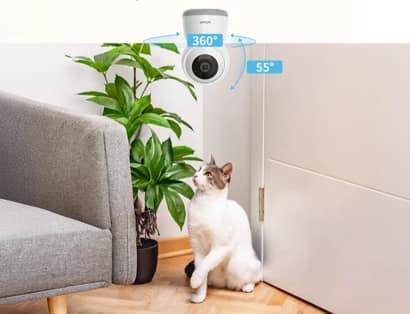
A wifi camera can show a nursery from a phone, while a baby monitor centres on caregiving tasks. Both provide video, but they differ in audio, connection options, dedicated displays, alert priorities, privacy controls, and behaviour during an internet outage.
A baby monitor may use WiFi, an FHSS radio link, or both. The choice depends on whether parents need viewing outside the home, a screen that works without a phone, dependable overnight audio, or wider smart-home use.
This comparison focuses on daily operation rather than labels. It explains connection paths, checks the features that matter at night, and keeps camera use separate from safer-sleep practices recommended by the NHS.
Begin with the care routine
A wifi camera suits parents who want app-based access from different locations and already manage other home devices by phone. It can also be reused later for a playroom or entrance. Its usefulness depends on router coverage, account security, app availability, and notification settings.
A baby monitor suits routines centred on a dedicated parent unit, continuous audio, quick controls, and nursery-specific alerts. Some ieGeek models provide 2K video, pan and tilt, cry detection, night vision, two-way talk, or a 5-inch display. Features vary by model and connection type.
Compare the core technologies
The camera lens is only one part of the system. Connection method, display, alert logic, night performance, and account design shape the experience at 3 a.m. Evaluate how each feature supports a specific care task rather than choosing the longest feature list.
Connection path
A wifi camera connects through the home router and usually needs internet access for viewing away from home. A dedicated monitor may use FHSS directly between camera and parent unit. Direct links reduce dependence on broadband, while WiFi provides wider remote reach.
Screen and controls
Phone viewing is convenient, but calls, low battery, operating-system settings, and app permissions can interrupt it. A dedicated parent screen remains available for one task. The ieGeek Baby 5, for example, combines a 5-inch display with dual-band WiFi, providing more than one viewing route.
Audio and alerts
Nursery monitoring often depends on sound before video. Cry or noise alerts, continuous audio, and clear two-way talk may matter more than maximum resolution. General security cameras usually prioritise motion events. Check whether audio continues when the phone screen locks and how alert schedules behave overnight.
Night viewing
Infrared night vision lets a camera observe a dark room without visible lighting. Pan-and-tilt control can help after a child moves, but it does not replace careful placement. Test the cot view at night and remove close objects that reflect infrared light into the lens.
Match features to the household
The table compares practical needs rather than declaring one category universally better. Product functions vary, and a strong home network can change the result. Before buying, identify who watches, where they watch from, and how the system should behave during a broadband or phone interruption.
| Household Need | WiFi Camera | Dedicated Baby Monitor | Check Carefully |
|---|---|---|---|
| Viewing away from home | Usually strong through an app | Available on connected models | Account and internet security |
| Phone-free overnight use | Usually limited | Dedicated screen and controls | Parent-unit battery life |
| Broad reuse later | Indoor or security roles | Mainly nursery-focused | Mounting and audio features |
| Broadband outage | Local recording may continue | Direct FHSS may still operate | Exact model behaviour |
First-time parents
A dedicated screen can reduce phone handling during feeds and night checks. Choose simple controls, dependable audio, and a clear cot view. A baby monitor should support observation without encouraging constant screen watching, and it should remain easy for another caregiver to understand.
Multi-room and travel use
App access can help when caregivers move around a larger home or travel, while a portable parent unit avoids dependence on guest WiFi. Check camera pairing limits, split-screen support, power adapters, and whether the system can create separate permissions for family members without sharing one password.
Install around safer sleep
The NHS advises that the safest place for a baby to sleep during the first six months is a cot in the same room as a caregiver. Monitoring equipment adds information, not protection from sleep-related risks. Keep the sleep space clear and follow current professional guidance.
- Position the camera outside the child’s reach and secure every power cable.
- Test the cot view, audio, alerts, and parent controls in full darkness.
- Change default credentials, enable updates, and remove access that is no longer needed.
Choose the viewing system
A baby monitor with a dedicated screen can prioritise overnight care, while a connected model can add remote phone access. Select the model that matches the routine. Do not pay for remote features that will remain disabled or ignore a direct link when broadband is unreliable.
Avoid common nursery mistakes
Poor results usually come from placement, alert overload, shared accounts, or assumptions about connectivity. A nursery system should work quietly in the background and make important events obvious. If it creates constant uncertainty, simplify the settings before adding more devices.
Mounting too close to the cot
Cables, stands, and small parts must stay outside the child’s reach. Use a stable mount and recheck it as the child becomes mobile. A wide view from a safe position is better than a close view that introduces a physical hazard or can be pulled down.
Treating resolution as the main measure
2K or 5MP video can provide detail, but parents often need reliable audio, usable night vision, and quick access more. A wifi camera with sharp daytime video may still be frustrating if notifications arrive late or the router signal weakens behind a closed nursery door.
Sharing one login
The National Cyber Security Centre recommends changing default passwords and keeping smart cameras updated. Use separate accounts when available, protect the router, and disable remote viewing if it is not required. Review access after babysitting arrangements, travel, or household changes.
Expecting the camera to interpret health
Video can show movement and sound can flag a cry, but consumer monitoring does not diagnose illness. Check the child directly when concerned and seek professional advice when appropriate. Keep product alerts in their proper role: prompts to look, listen, and respond.
Decide on the workflow, not the label
Choose a dedicated monitor when phone-free viewing, direct connectivity, and nursery-specific controls lead the decision. Choose a general WiFi model when remote app access, later reuse, and smart-home integration matter more. A hybrid system may suit households that need both.
Whichever route you choose, test it during the routine it must support. Clear audio, a safe camera position, secure access, and understandable alerts matter more than a feature that looks impressive but remains unused after setup.





Leave a Comment